
Request EV Profile in MSSL
Mar 2, 2026
|
OVERVIEW: This page walks you through the process of requesting an EV account in MSSL. You can upgrade your OV account in MSSL for no additional cost (no setup/activation, hosting or domain profile vetting fees). At the completion of this procedure, you will be able to upgrade your OV account to EV. For more MSSL guides, please refer to this page. |
Guidelines
-
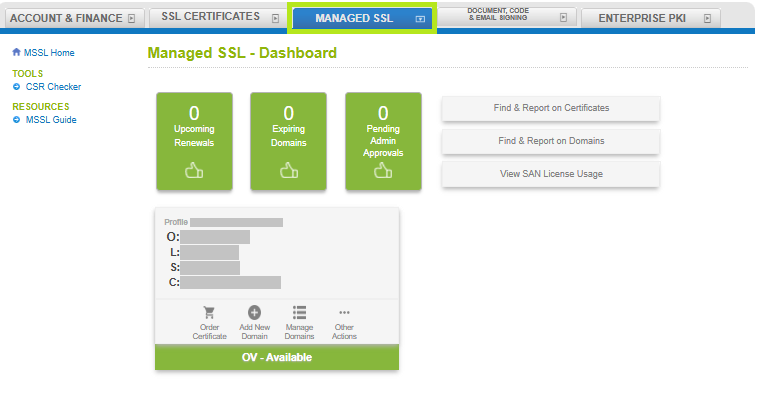
Log in to your GCC account, then go to the Managed SSL tab.
-
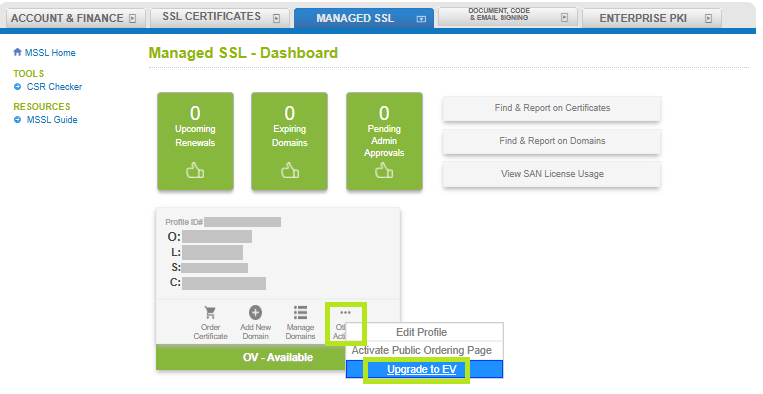
In your EV profile, hover to Other Actions and click Upgrade to EV.
-
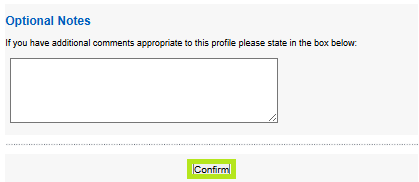
Fill out all the required fields in the Request EV Account window, then click Confirm at the bottom of the page.
-
Review all the information you have entered, then click Complete.

-
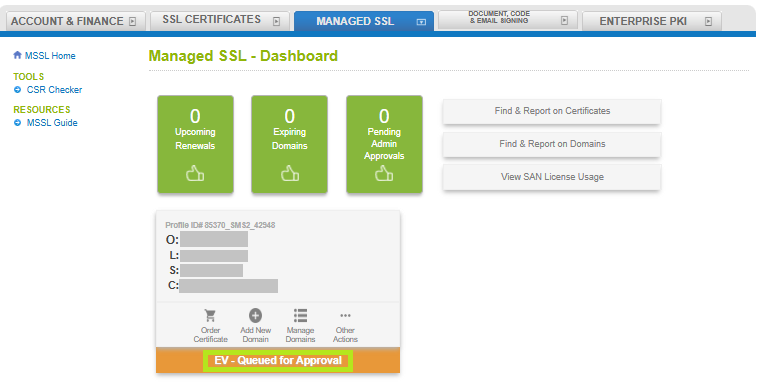
You have successfully submitted a request for an EV Profile. Your MSSL tab should now show that your Profile is EV- Queued for Approval.
|
WHAT'S NEXT: Our vetting team will now review the information you provided and will contact you for additional details. Once your request is approved, you will receive an email notification confirming the approval of your EV Profile and you can now add a new domain to be able to order a new certificate. To add a new domain in MSSL, please refer to this page. |
SSL Configuration Test
Check your certificate installation for SSL issues and vulnerabilities.