
Reissue Mark Certificate
Feb 3, 2026
Reissue Mark Certificate
|
OVERVIEW: This page walks you through the process of reissuing your GlobalSign Verified Mark Certificate. At the completion of this procedure, you will be able to reissue your certificate. For more certificate management guides, please refer to this page. |
Guidelines
-
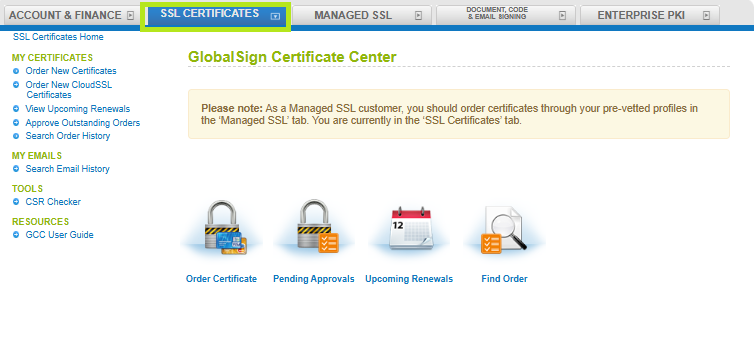
Log in to your GCC account and go to SSL Certificates.
-
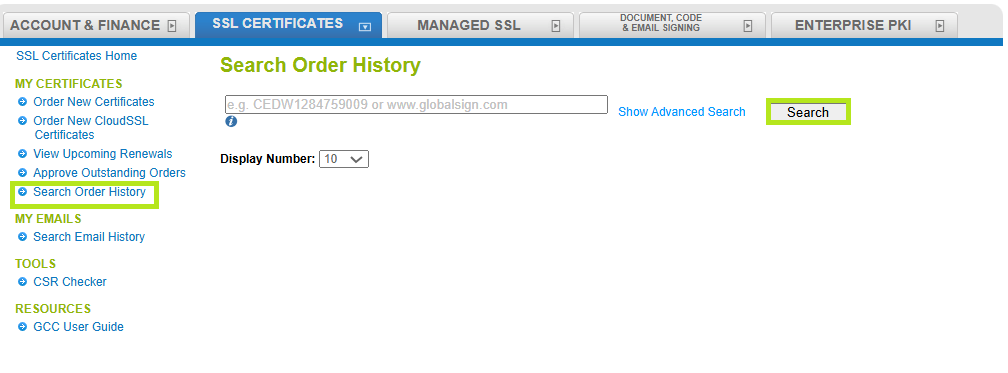
Under My Certificates, click Search Order History. Then, enter your order ID or simply click Search to view all of your SSL certificate orders.
-
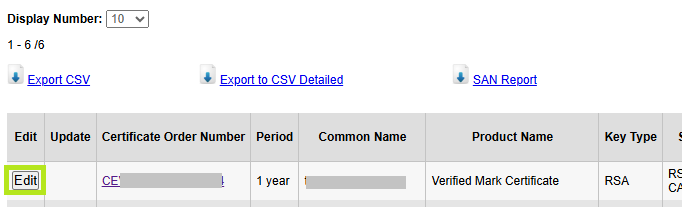
Click on Edit button next to the your order.
-
Click on Reissue Certificate (if available). This will open a new ordering process.
IMPORTANT: Reissuing Mark Certificate will not allow changes to its information or add/update the logo (SVC file). If you need to update or change your logo, please contact support to help reach out to vetting while the logo verification is in progress. Once the logo has been verified, changes are no longer possible. In that case, you’ll need to cancel your current order and place a new order with the updated logo.

Related Articles
SSL Configuration Test
Check your certificate installation for SSL issues and vulnerabilities.