
Domain Verification Process in MSSL
May 1, 2026
Domain Verification Process in MSSL
|
OVERVIEW: This page walks you through the process performing domain verification. At the completion of this procedure, you will be able to perform a self-service verification to validate your domains to existing MSSL accounts. For more MSSL domain management guides, please refer to this page. |
Guidelines
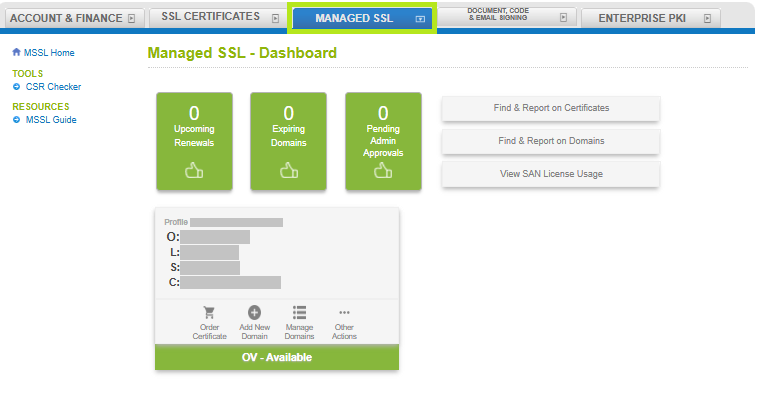
- Log in to your GCC account, then go to the Managed SSL tab.
-
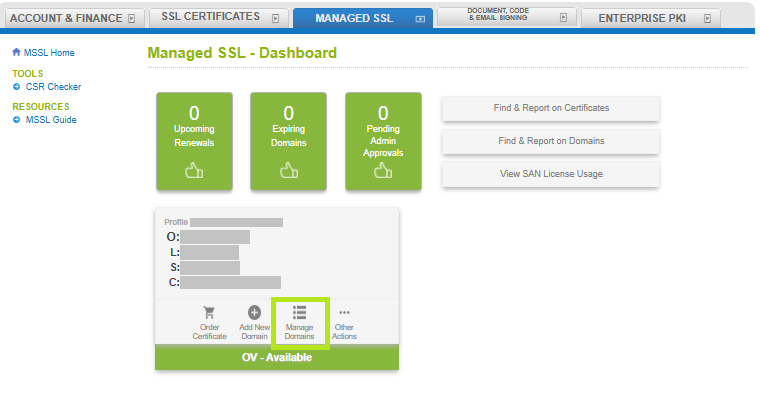
In your profile, click Manage Domains.
-
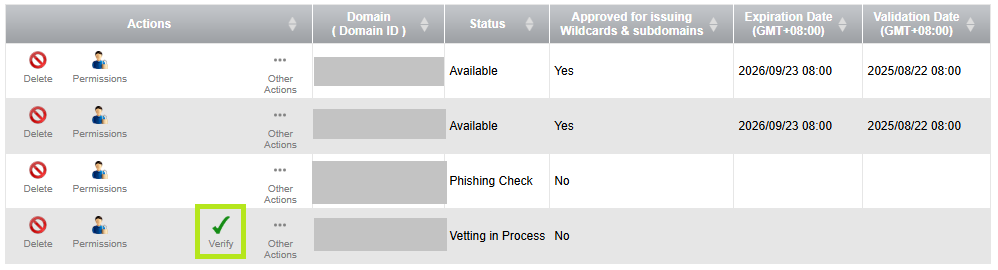
Under the Actions tab, click the Verify/check button. A pop‑up window will appear, allowing you to continue with the verification process.
-
From that page, you can proceed with the verification.
INFORMATION: If you want to change your domain validation method, please refer to this page. To learn more about your chosen verification process, see Domain Verification Process guide.
WHAT'S NEXT: Once your domain has been verified, you can order Certificates in MSSL. To order new Certificates in MSSL, please refer to this page.
Related Articles
SSL Configuration Test
Check your certificate installation for SSL issues and vulnerabilities.